Start free
Block fake clicks · Cleaner results

Less fake clicks. More real growth.

Protect your ad budget from fake and low-quality traffic, analyze your ads, create better creative, and manage growth from one workspace.

Kart bilgisi gerekmez1 site + aylık 5.000 event ücretsizDakikalar içinde kurulumİstediğin an iptal
GGoogle AdsCampaign IP exclusions
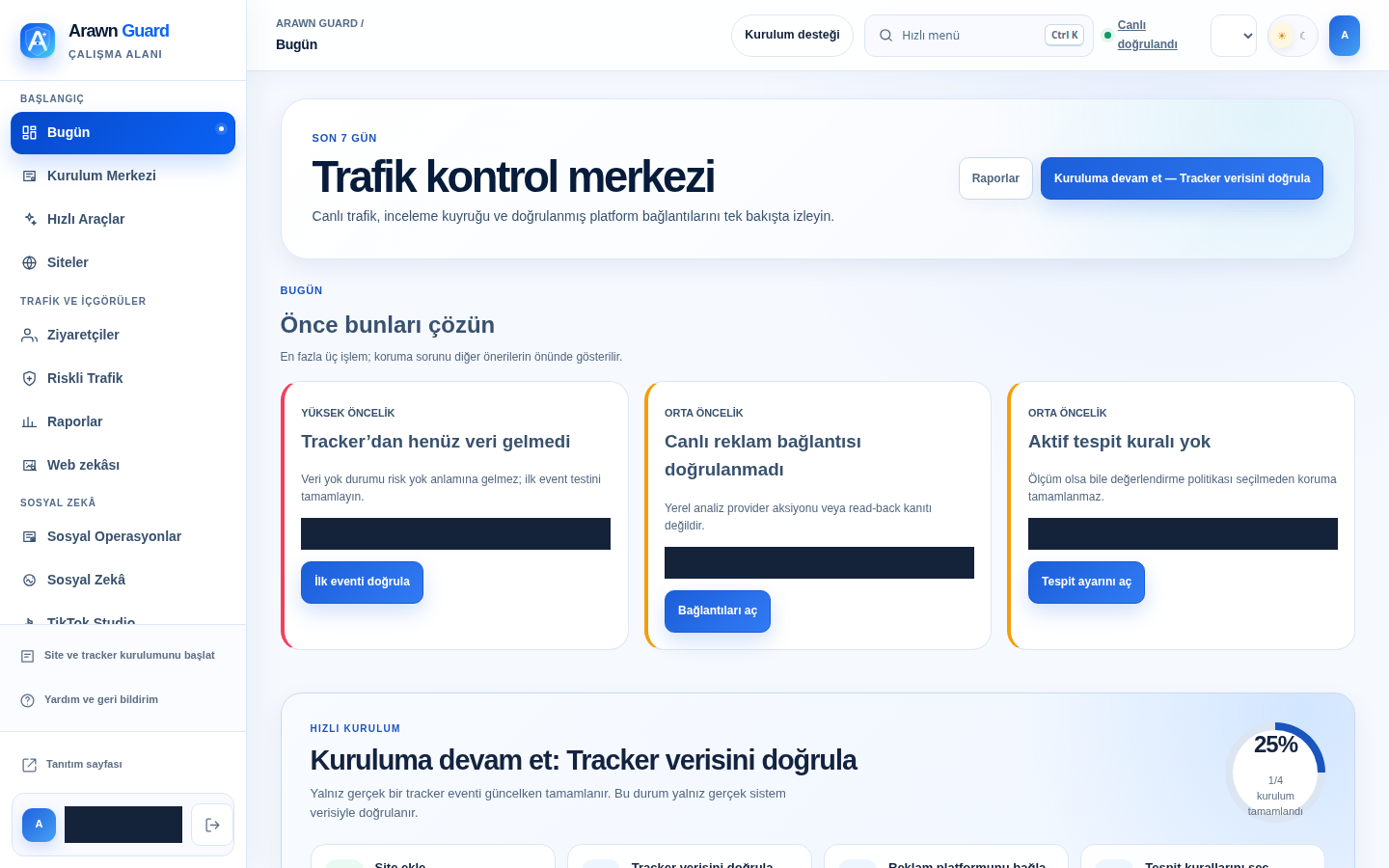
REAL PRODUCT SCREEN · REDACTED Redacted ClickTidy QA dashboard showing tracker setup, priority actions, and platform health
  1. 01First-party measurement
  2. 02Risk evaluation
  3. 03Human decision
  4. 04Provider read-back
This is a real panel capture from an isolated ClickTidy QA session. Identity and fixture fields are redacted; unconfigured providers are not presented as success.
01
Privacy-by-designConsent-aware data collection
02
Explainable signalsReason codes alongside every score
03
Authorized user controlReview before platform action
04
Visible setupTracker and connection health states
EVIDENCE CHAIN

Every click decision is traced from source to provider outcome.

ClickTidy separates measurement, uncertainty, human decision, and external outcome; an unmeasured signal is never presented as risk or success.

  1. 01
    Source and click IDThe ad source and supported click identifier are linked to a first-party event.
  2. 02
    SessionConsent state, time, and site scope are stored inside the tenant boundary.
  3. 03
    BehaviorRepeat, velocity, and engagement signals remain separate evidence.
  4. 04
    Network and geographyGeoIP, ASN, and Tor measurements retain version and time evidence.
  5. 05
    False-positive guardMissing measurement stops action; a legitimate conversion can release a risk decision.
  6. 06
    Human decisionAn authorized user sees the reasons and approves or rejects the candidate.
  7. 07
    Supported actionOnly an officially supported, scoped Google Ads action enters the queue.
  8. 08
    Provider read-backSuccess appears only after a separate API read verifies the result; expiration and restore stay traceable.

Color never carries the decision alone: blue is measurement, amber is review, coral is a risk candidate, and green means verified read-back only.

The right action for each platform

Stop the clicks that waste your Google Ads budget.

ClickTidy shows each suspicious click with its reasons, applies official Google Ads IP exclusions after your approval and verifies the result via the API.

OFFICIAL API FLOW

Google Ads

Approved high-risk IPs can be queued for the IP exclusion list of selected supported campaigns.

  1. 1A high-risk IP candidate and reason codes are created.
  2. 2An authorized user reviews the campaign scope.
  3. 3A negative IP criterion is sent to supported selected campaigns.
Official capabilityCampaign IP exclusions

Live status appears only after provider API verification; unverified, pending, and failed states remain distinct.

Traffic, web and social intelligence

Run traffic, web and social-media signals from one command center.

ClickTidy combines click-fraud signals, safe web and SEO measurement, source-based competitor research, and content analysis with explainable recommendations and human approval.

01 AD OPERATIONS STUDIO

Prepare region-based campaign plans

Turns a brief into paused Google Ads campaign, ad-group and ad-set drafts; metrics are reviewed before recommendations reach user approval.

PAUSED draftsMetric review
Try Site-Free Quick Tools
02 COMPETITOR RESEARCH DESK

Bring competitor sources into one workspace

Organizes competitor domains, source links and research notes with verification status, then turns findings into trackable actions.

Source linksVerification state
Try Site-Free Quick Tools
03 OPPORTUNITY RECOMMENDATIONS

See the next highest-value task

Combines traffic, SEO, social and competitor research records in one action queue with priority, evidence state and ownership.

PriorityAudit trail
Try Site-Free Quick Tools
A transparent start

See your traffic first, then scale.

ClickTidy never implies that payment was collected. Paid plan changes use a manual approval flow in this release.

Free
TRY 0.00 / month

Validate setup and paid-traffic visibility.

1 site5,000 events
  • 1 site
  • 5,000 events per month
  • Google Ads detection settings
  • Core reports
Choose plan
Starter
TRY 1,000.00 / month

A controlled start for single-brand teams.

3 site50,000 events
  • 3 sites
  • 50,000 events per month
  • Presets and simulation
  • Manual platform actions
Choose plan
Enterprise
Custom quote

Multi-client, high-volume operations.

100 site500,000 events
  • Up to 100 sites
  • High volume
  • Tenant and role management
  • Custom operations plan
Choose plan

ClickTidy never implies that payment was collected. Paid plan changes use a manual approval flow in this release.

Bir sonraki sahte tıklama bütçenden çıkmadan başla.

Ücretsiz hesabını aç, tracker kodunu ekle, Google Ads hesabını bağla. Şüpheli trafik gerekçeleriyle paneline düşsün; neyin hariç tutulacağına sen karar ver.

Ücretsiz Korumaya Başla → Kart gerekmez · Başlangıç planı aylık ₺1.000
  1. Ücretsiz hesabını oluştur
  2. Tracker kodunu sitene ekle
  3. Google Ads hesabını bağla, şüpheli tıklamaları incele
FAQ

Frequently asked questions

Clear answers about platform capabilities, setup and decision flows.

Will setup change my existing ad campaigns?

No. Platform mutations are queued only after a live connection, supported object, and authorized user approval.

Is suspicious traffic automatically treated as a confirmed failure?

No. Decisions enter a review queue with risk, confidence, and reasons; outcomes have distinct states.

Can agencies manage multiple clients?

Yes. Multiple clients, sites, and platform connections can be managed with tenant isolation.

Which traffic signals can I configure?

Google Ads have separate settings for repeat clicks, out-of-geo traffic, proxy, VPN, Tor, data-center networks, allow lists and presets.

Does a high risk score automatically change my campaigns?

No. A score creates review context. Platform actions depend on configuration, authorization, supported objects and a verified provider response.

Can I test settings before taking action?

Yes. Simulation helps teams inspect how thresholds and presets classify traffic before an operational platform action is approved.

How are Google Ads connection states shown?

Unverified, pending, failed and live-verified states remain visibly distinct. An integration is never presented as successful without provider verification.

What does automated signal scanning cover?

Paid tracker sessions are evaluated with repeat-click, velocity, behavior, network and geography signals. Results enter the review queue with reason codes.

How does competitor research work?

Competitor domains, source links and research notes you add are stored with verification status. ClickTidy does not present unverified information as real market data.

Are recommendations automatically applied to ad accounts?

No. Platform actions require a supported capability, verified connection, authorized user approval and successful provider read-back.

Is social content published automatically?

The current release creates editable post, carousel and short-video drafts; it does not publish to social accounts automatically.

Your first step takes two minutes

Know why your ad traffic looks suspicious.

Create a free workspace, add your first site, and get the tracker installation code.

WhatsApp